

You may have seen ads saying: “Buy this AI invoicing tool and you’ll be ready for Europe’s new invoice rules.”
For most businesses, that’s not true, and believing it can cost you money for software that doesn’t actually keep you legal.
This guide clears it up in plain language. We’ll explain what the new rules really are, what you actually need to follow them, and where AI tools genuinely help (and where they don’t). No jargon. If you run a small business or work for yourself, this is written for you.
Affiliate disclosure: We may earn a commission from some links here. It never changes our verdict. We evaluate tools independently.
The short version
- Across Europe, businesses are being required to send invoices as a special computer-readable file instead of a paper invoice or a PDF.
- This is already the law in some countries and is arriving in others over the next couple of years.
- To follow the rule, you mostly just need the right invoicing or accounting software — not a fancy “AI” tool.
- AI tools are useful for a different job: dealing with the invoices you receive from suppliers. That’s where they’re worth the money.
This is general information, not tax or legal advice. The rules and dates change: check your own situation with an accountant or your tax office before acting.
What’s actually changing?
For years, “electronic invoice” just meant emailing a PDF instead of posting a paper copy. That’s now changing.
The new rules say that for many business-to-business sales, your invoice has to be a structured file — a document built so that another company’s computer can read it automatically, with no one retyping anything. A normal PDF doesn’t count, because to a computer a PDF is basically a picture.
Governments are doing this to cut tax fraud: when invoices are machine-readable, tax offices can check them far more easily. The whole thing is being pushed along by a big EU law (its nickname is ViDA), but the part that affects you is simpler — your own country is setting its own start date and its own system.
Does this apply to you yet?
It depends on your country and the size of your business. Here’s the simple picture as of mid-2026:
| Your country | Is it the law yet? |
|---|---|
| Italy | Yes — has been for years |
| Romania | Yes — already required |
| Poland | Yes — rolling out through 2026 |
| Belgium | Yes — since January 2026 |
| France | Starting September 2026 |
| Germany | You must be able to receive these invoices now; sending them becomes required gradually up to 2028 |
| Spain | Coming, around 2027–2028 |
Two simple takeaways:
If you sell to other businesses in Italy, Romania, or Belgium, this is already your reality. Paper and plain PDFs are no longer enough for those sales.
Even before you have to send these invoices, you usually have to be able to receive them. Germany is the clearest example — every business there has had to be able to accept these files since the start of 2025. So at the very least, make sure you can receive one.
The one thing the ads don’t tell you
Here’s the part that saves you money. “AI invoicing tool” is sold as one thing, but it’s really two different jobs — and people get charged for the wrong one.
Job 1 — Following the rule (sending the right kind of invoice). This is what the law actually requires: creating your invoice in the official format and sending it the right way. The important bit: this is not an “AI” job. It’s just a technical standard, and it’s handled by your invoicing or accounting software (or a small connector service that links you to the official network). There’s nothing clever about it, your software either produces the correct file or it doesn’t.
Job 2 — Handling the invoices you receive. This is the job AI is genuinely good at: reading the invoices, receipts and bills that come in to you, pulling out the numbers automatically, and dropping them into your accounts so nobody has to type them by hand.
Why this matters: if your goal is just “follow the new rule,” an AI tool might do nothing for you, because your accounting software does that part. But if your problem is “someone on my team spends hours typing supplier invoices into the system every week,” that’s exactly what an AI tool fixes, and the new rules won’t.
So the real first question isn’t “which AI invoicing tool is best?” It’s “which of these two problems do I actually have?”
What you need to follow the rule (the simple checklist)
If your only goal is to stay legal, here’s the whole list:
- Find out if it applies to you — which country’s rule, and your start date (an accountant can confirm in minutes).
- Check your current invoicing or accounting software. Does it already create the official invoice file for your country? For many small businesses, it does, or it’s a cheap add-on. That might be all you need.
- If it doesn’t, get a connector service (these link you to your country’s official invoice network).
- Make sure you can receive and store these invoices too — and keep them for as long as the law requires (often up to 10 years, but some countries 5 years for example Poland).
Notice that “AI” isn’t on that list. That’s on purpose — a legal tax document needs to be exactly right every time, which is a job for fixed rules, not a smart-but-occasionally-wrong assistant.
Where AI tools are actually worth paying for
Now to the fun part AI does well: dealing with everything that comes in. Supplier invoices, receipts, bills, some as proper files and many still as PDFs or scans. A good AI tool reads them, grabs the right numbers, and feeds them into your system so no one keys them in by hand.
We score every tool two ways, each out of 10: a Sovereignty Score (is your data kept safe and in Europe, with proper data agreements?) and a Usability Score (is it actually pleasant to use?). Because these tools handle your money data and other people’s personal details, where your data lives really matters.
Rossum — European roots, built for high invoice volumes
Founded in Prague in 2017, Rossum uses AI to read your invoices, pull out the data, and help you check and process them. Worth knowing: Rossum was acquired by the US spend-management company Coupa in May 2026, so it’s now US-owned despite its European roots — if EU data residency is the reason you’re choosing it, confirm what your plan and contract actually guarantee post-acquisition. It’s built for businesses handling a lot of invoices, not the occasional one. It suits higher-volume operations rather than freelancers or very small teams.
Bitskout — easier to start with, friendlier price
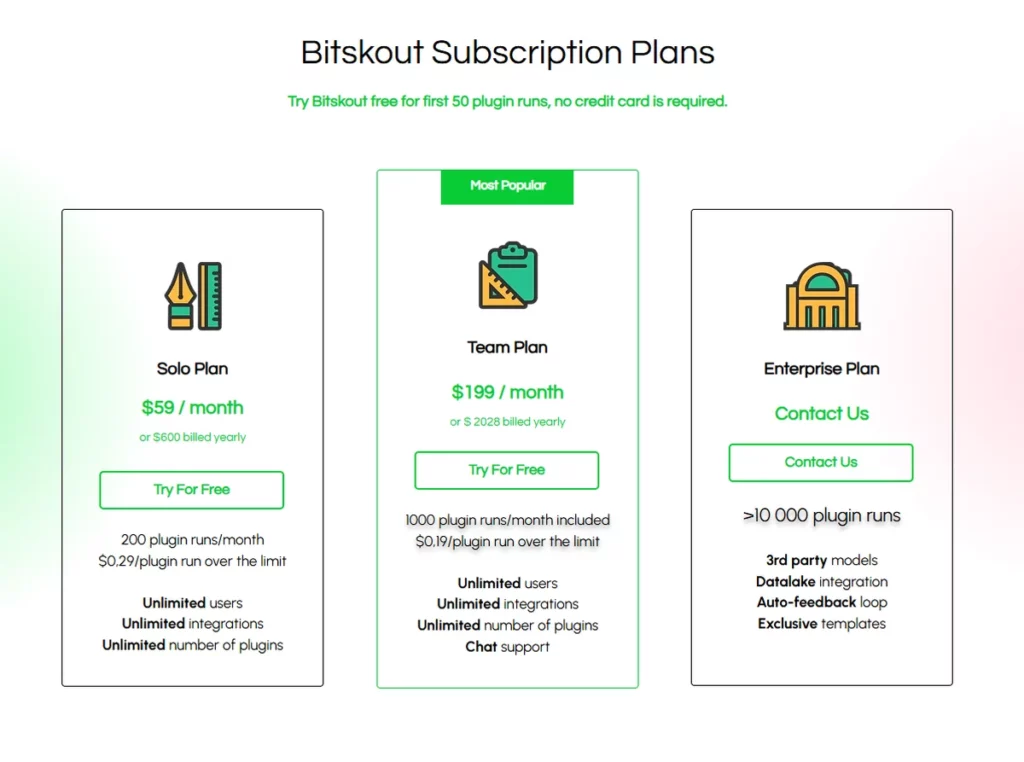
Bitskout pulls data out of documents, emails and files and feeds it into tools you already use, with a gentler starting price for smaller teams. Best for: small and medium businesses that want to stop typing invoices by hand without a big project. Worth knowing: it’s a smaller vendor, rather than a large enterprise platform — fine for many, but check where your data is processed and that a proper data agreement is available before putting real client information through it.
A note on US tools (QuickBooks, FreshBooks, etc.)
These are popular and easy to use, and we won’t pretend otherwise. But for Europe they’re a weaker fit for two reasons. First, they don’t always create the exact official invoice file your country requires, so they might not actually keep you legal. Second, your data often sits outside Europe, which is a bigger deal here than in the US. You can use them, but you’ll have to check both points carefully first.
At a glance
| Tool | Where it’s from | What it’s for | Data kept in EU? | Sovereignty | Usability |
|---|---|---|---|---|---|
| Rossum | Czechia founded, but US owned today (Coupa) | Reading lots of incoming invoices | Yes — check your plan | 6 / 10 | 8 / 10 |
| Bitskout | EU/US | Reading incoming invoices & documents | Check your plan | 6 / 10 | 7 / 10 |
| FreshBooks | 🇺🇸 | Small-business invoicing | Limited | 4 / 10 | 8 / 10 |
| QuickBooks | 🇺🇸 | Small-business accounting | Limited | 4 / 10 | 7 / 10 |
| Your own accounting software / a connector service | Varies | Actually following the rule | Choose an EU option | — | — |
Scores are our own honest assessment, not the companies’ claims. “Check your plan” means exactly that — better data protection is often only on higher-priced plans.
Don’t waste your money
Being straight with you:
- Don’t buy an AI tool just to “become legal.” That’s usually not what makes you legal, your normal invoicing software does. Check that first; for many small businesses it’s already sorted, at little or no extra cost.
- Don’t buy a powerful tool for a handful of invoices a month. You won’t save enough time to justify it.
- Don’t trust “best invoicing tool” lists that never mention where your data goes or whether the tool meets your country’s rule. Those are the two questions that actually matter.
- Do get an AI tool if a real person is spending real hours typing in supplier invoices every week. That’s the moment it pays for itself.
Which one is right for you?
“I just need to follow my country’s new rule.” Start with the invoicing software you already use: Check if it makes the official invoice file for your country. If not, add a connector service. You may not need AI at all.
“I’m buried in supplier invoices every week.” This is the AI job. For lots of invoices and strong European data protection, look at Rossum. For something cheaper and simpler to start, look at Bitskout. Check each one’s data terms first.
“I work for myself / I’m a freelancer.” You mainly need the basics, be able to receive these invoices, and send them in the right format when your turn comes. Don’t overspend on tools you won’t use.
“I already use QuickBooks or FreshBooks.” It can work, but do two checks: does it make the official invoice file your country needs, and where does your data live?
Common questions
Will an AI invoicing tool make my business follow the new EU rules? Usually not by itself. The rules are about sending invoices in an official format — that’s your accounting software’s job, or a connector service. AI tools mostly help with the invoices you receive.
Which countries already require this in 2026? Italy, Romania, Poland and Belgium already do. France starts in September 2026, Germany is phasing it in up to 2028, and Spain is coming around 2027–2028. Always check the current date for your own case.
Is a PDF invoice good enough? Not where these rules apply. A PDF is like a picture to a computer — you need the special machine-readable file instead.
Can I use American tools like QuickBooks in Europe? You can, but check two things: that the tool creates the official invoice file your country requires, and where your data is stored.
What’s the first thing a small business should do? Find out if the rule applies to you yet, then check whether your current software already handles it. Sort that out first; only add an AI tool if you really do receive lots of invoices.
How we score: every tool is rated on keeping your data safe and in Europe, and on how easy it is to use using our published “How We Test” method. No paid rankings. Last checked June 3rd 2026; these rules change often, and we update this guide when they do.